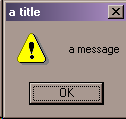
Alert Dialog

Alert Dialog Sample

Creating the Dialog

Create an Alert Dialog by calling dialog.alertDialog with the three arguments shown in the following table.

Argument
Data type/notes
self
the window (background) that is the parent for the dialog
message
quoted string of alert message to be displayed inside dialog
title
quoted string of text to be displayed in dialog's title bar

Example:

Above dialog was created with this line of code:

result = dialog.alertDialog(self, 'a message', 'a title')

Interacting With the Dialog

The alertDialog component returns a wxPython DialogResults object which contains 2 attributes, as shown in the following table

Name of value
Description
accepted
True = user clicked OK
False = user clicked Cancel
returned string containing the name of the button clicked by the user

Example:

The sample dialog shown at the top of this page returns the following results when the user clicks its only button:

accepted: True
returned: Ok